About Invisalign® Personalised Plan.
Invisalign® Personalised Plan is a proprietary technology that automates and applies your specific clinical preferences to deliver a consistent, personalized, high-quality initial ClinCheck® set-up.
Unlocks Flex Rx, a simplified prescription form optimised from 10 pages to 1
Improves consistency of your ClinCheck® set-ups
Reduces treatment plan turnaround times and minimizes the number of ClinCheck® modifications
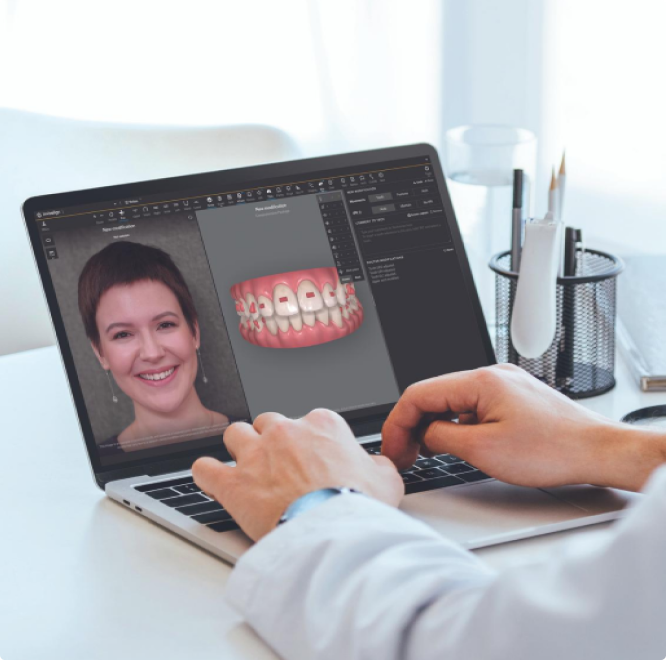
Enables use of ClinCheck® Plan Editor, which allows you to make major modifications to your treatment plans yourself, view side-by-side comparisons, and customize treatment plans for specific cases

A more efficient treatment planning experience starts with Invisalign® Personalised Plan.
Initial ClinCheck® treatment plans are available 56% faster for doctor review when submitted with Invisalign® Personalised Plan.1
The majority of initial ClinCheck® treatment plans submitted with Invisalign® Personalised Plan were available for review within 6 hours or less.2
ClinCheck® treatment plans are sent back to a CAD designer less than half the time for orders where doctors have used Invisalign® Personalised Plan and ClinCheck® Live Update.3
Initial ClinCheck® treatment plans are available 56% faster for doctor review when submitted with Invisalign® Personalised Plan.1
The majority of initial ClinCheck® treatment plans submitted with Invisalign® Personalised Plan were available for review within 6 hours or less.2
ClinCheck® treatment plans are sent back to a CAD designer less than half the time for orders where doctors have used Invisalign® Personalised Plan and ClinCheck® Live Update.3
Benefits of Invisalign® Personalised Plan:

Consistency & peace of mind
Rx choices, clinical preferences, and special instructions are applied to each new treatment plan as intended
Removes variability between your ClinCheck® treatment plans
Automatically applies your preferences to initial ClinCheck® set-ups, and is delivered to you automatically, without the need for an Align CAD designer

Efficiency & time savings
Consistent, high-quality initial treatment plans designed with the goal of reducing modifications
When modifications are needed, conveniently use Plan Editor for significant changes and 3D Controls for more minor, precise changes and see them in minutes with ClinCheck® Live Update.
Unlocks Flex Rx for a more simplified prescription process.
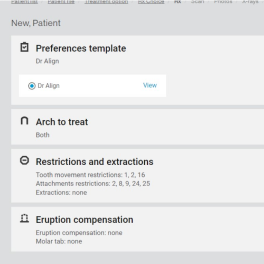
Simplified prescription form with Flex Rx
Single webpage with all case options
Optimised from 10 pages to 1, providing you more time savings
Consistency & peace of mind
Rx choices, clinical preferences, and special instructions are applied to each new treatment plan as intended
Removes variability between your ClinCheck® treatment plans
Automatically applies your preferences to initial ClinCheck® set-ups, and is delivered to you automatically, without the need for an Align CAD designer
Efficiency & time savings
Consistent, high-quality initial treatment plans designed with the goal of reducing modifications
When modifications are needed, conveniently use Plan Editor for significant changes and 3D Controls for more minor, precise changes and see them in minutes with ClinCheck® Live Update.
Unlocks Flex Rx for a more simplified prescription process.
Simplified prescription form with Flex Rx
Single webpage with all case options
Optimised from 10 pages to 1, providing you more time savings
Hear what your peers are saying

Dr. Barry Glaser

Dr. Graham Gardner
Dr. Barry Glaser
Dr. Graham Gardner
Steps to create your Invisalign® Personalised Plan

Step 1
Fill out the clinical intake form

Step 2
Your personal preferences are programmed, validated, and reviewed with you to ensure accuracy.

Step 3
Start creating your initial ClinCheck® set-ups using your Invisalign® Personalised Plan.

Step 4
Periodically update your Invisalign® Personalised Plan to refine or expand your clinical preferences.
Step 1
Fill out the clinical intake form
Step 2
Your personal preferences are programmed, validated, and reviewed with you to ensure accuracy.
Step 3
Start creating your initial ClinCheck® set-ups using your Invisalign® Personalised Plan.
Step 4
Periodically update your Invisalign® Personalised Plan to refine or expand your clinical preferences.
Need more information?
To learn more about Invisalign® Personalised Plan and to walk through the clinical intake form with a dedicated Clinical Protocol specialist, join us for a virtual enrollment webinar.

FAQs
What is the cost of developing your Invisalign® Personalised Plan?
Creating and using your Invisalign® Personalised Plan has no additional cost.
How much time is needed to create my Invisalign® Personalised Plan?
The time needed to create your customized protocol depends on the complexity of your clinical philosophy and clinical preferences. To get started with Invisalign® Personalised Plan, there is an initial clinical intake form that takes approximately 15-20 minutes to complete. After you complete the intake form, you will be prompted to schedule an interview with a clinical protocol specialist at your convenience. During this efficient call, we will verify your preferences and show you example cases where your treatment preferences are applied to ensure satisfaction.
Can doctors modify ClinCheck® treatment plans that have been setup using Invisalign® Personalised Plan?
Yes, 3D controls, Live Update and ClinCheck® comments are enabled to modify a treatment plan
Is a CAD designer available to adjust or modify a ClinCheck® treatment plan?
Yes, the initial ClinCheck® treatment plan will be sent without any human intervention. If initial ClinCheck® treatment plan needs to be changed, doctors may use Live Update or ClinCheck® comments. If using ClinCheck® comments, the case will be routed back to and modified by a CAD designer.
Once activated, will preferences be applied to cases submitted by all doctors in my practice?
If all doctors submit under the same ClinID and share the same clinical philosophy, then all cases using your Invisalign® Personalised Plan will have the preferences applied.
If all doctors submit under the same ClinID but do not share the same clinical philosophy, please send an email to IPPContactUs@aligntech.com to set up multiple protocols under the same account.
Who do I contact if my ClinCheck® treatment plan isn't what I expected?
Changes can be made to an individual treatment plan using 3D controls, Live Update or entering comments into the ClinCheck®. If an issue has been observed over multiple cases, then send an email to IPPContactUs@aligntech.com and include patient ID number (PID) and a short description of the problem. The IPP team will investigate and come back with options for resolution.
Who do I contact if I need to change my clinical preferences?
Adding more customisation to a protocol is part of this process. If changes or updates to clinical preferences are needed, please send your request via email to IPPContactUs@aligntech.com. The IPP team will review request and reply back with changes or options.